

imgosint
Where a picture has been, and how sure you are
A desktop app for macOS and Windows. It searches one picture on several public engines, then measures every candidate it can fetch on your own machine.
None
Accounts, licence checks or telemetry. Nothing is sent to Vulnara.
Every result gets a number
Several engines, one picture
One picture, several public reverse image search engines, no API key and no account. A crop and a straightened copy of a photographed page go in as queries of their own.
Every candidate measured
Every candidate it can fetch is compared with your picture by a 64-bit fingerprint, reported in the console’s bands: exact (0 to 4), near (5 to 12), similar (13 to 22), no match above 22. A byte-identical copy, with the same SHA-256, is reported as the same file.
Two second opinions
A visual-similarity model on your machine and a keypoint geometry check give two second opinions. When the measurements disagree, the report says so.
Negatives in writing
A candidate it couldn’t fetch is recorded as not compared, never as a negative. Blocked or failed engines are named, and a run that finds nothing ends in a written, dated negative.
The file itself, offline
Once its components are installed, reading the file needs no connection: SHA-256 and perceptual hashes, EXIF, XMP, IPTC and GPS metadata, an error level analysis heatmap, and multilingual text recognition.
A record of every run
Each run writes a custody record: case, operator, host, tool version, times in UTC, source SHA-256, run settings and proxy route, credentials removed. Compared images are kept, named by SHA-256 (at most 750 a run, and never more than 256 MB), beside a JSON record, an HTML report and a screenshot of each engine’s results.
How a run works
Illustrations
Read the file
Hashes, metadata, an error level analysis heatmap and text recognition, before anything goes online.
Search
The picture and its copies go to the engines you tick. Archived copies of the pages found are looked up by address.
Measure
Every candidate it can fetch gets a fingerprint distance, with visual similarity and keypoint geometry as second opinions.
Record
The custody record, the reports and the compared images, kept for every run. A stopped run still reports what it measured.
A finished run
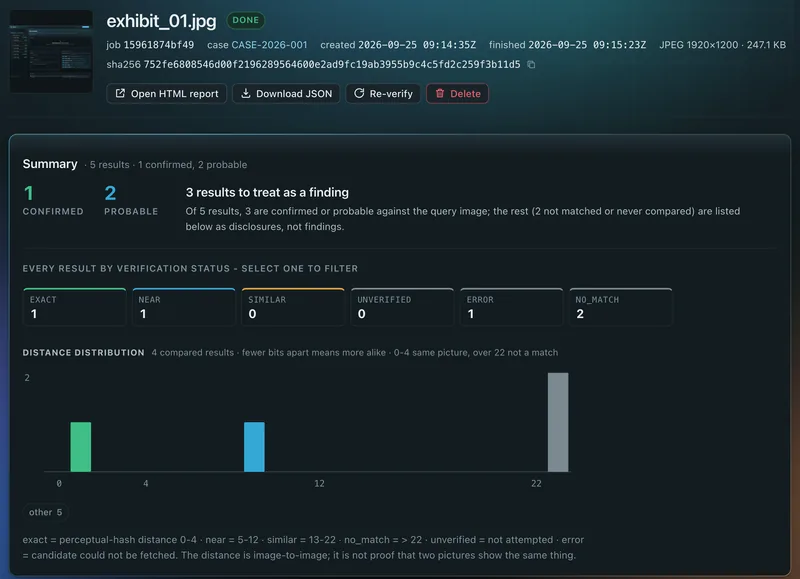
The real console, on a demo case.
- Confirmed and probable results first. The rest are listed as disclosures.
- Results counted by verification status, distances drawn with the band edges marked.
- The picture’s SHA-256, the case and UTC times at the top.
What imgosint won’t do
These limits are built in.
- No face-search services
- No integration with biometric face-search services, and no setting adds one.
- No identification
- A face score is a reason to look, never an identification. Face comparison runs on your machine, its labels are deliberately hedged, and its thresholds have not been validated.
- Similarity is not identity
- A small distance means two pictures look alike, nothing more.
- No logins
- No accounts, session cookies or scraping behind a login. Social platforms show up only when a public search engine has indexed a public page.
- Public sources only
- Public search engines, APIs you add your own key for, public Telegram channel previews and the pages they point to. Nothing behind an invite link or in a private channel.
- No quiet network calls
- Beyond fetching its components on first launch, it goes online only for the searches, checks and lookups ticked in the console, some by default, or named on the command line.
- No phoning home
- No account, licence check, telemetry or update check. Nothing is sent to Vulnara.
It runs on your machine. Here is what leaves it.
Searching means sending the picture somewhere. This is exactly where.
Stays on your machine
- Reading the file: hashes, metadata, error level analysis, text recognition.
- Every measurement, and every face comparison with its encodings.
- Reports, the custody record and the compared images.
- The console, which listens on 127.0.0.1 only.
What leaves, and where it goes
- The picture and its copies: a crop, a front-on copy, and face crops when face detection is on, which it is by default
- The engines you tick
- Requests for the candidate images
- The sites those engines point to
- Addresses of the pages found, never the picture
- The Wayback Machine
- Requests for public channel previews and channel look-ups
- Telegram and TGStat public pages, when ticked
- Words read off the picture
- Web search, when ticked
- GPS coordinates from the file
- A map lookup, when ticked
- Requests for result thumbnails, when you open the HTML report
- The sites they came from
- Downloads of its components
- Their public hosts, on first launch
Without a key it can search Google Lens, Bing Visual Search, Yandex Images and Sogou Images. Yandex is in Russia and Sogou in China, so leave them unticked if a picture must not go there. Each job can take its own proxy or VPN route, and the route is recorded.
For lawful work only
Investigations, verification, journalism, fraud and trust and safety. Where a picture has been, and whether it is really new.
Not for tracking, profiling or exposing private people. If a request doesn’t fit, we say no.
imgosint is not affiliated with Google Lens, Bing Visual Search, Yandex Images, Sogou Images or any other search service it can use.
What you need
Requirements
- A Mac with Apple silicon or Intel, or a 64-bit Windows PC. We’ll confirm minimum versions before release.
- About 3 GB free. The first launch downloads about 700 MB of components: a browser engine, image models and text-recognition language packs.
- Tesseract, installed separately, for text recognition.
- An internet connection to search and verify. Reading the file works offline once the components are installed.
Questions
Can we use imgosint today?
Not yet, and there’s no download or price. If your team does lawful investigations, verification or trust and safety, talk to us.
Does it find every copy of a picture?
No. Only what public engines have indexed and will return, and some block automated searches.
Is the custody record signed?
No. It is a careful record of what was done, not signed or chained, and not a certificate.
More from us
All products
Talk to us about imgosint
Doing lawful investigations, verification, journalism or trust and safety? Tell us who you are and we’ll write when there’s something to try.
Lawful use onlyAsk us to remove your details any time